Purchase Guide
Learn how to purchase GForce products using various payment methods
Overview
Purchase GForce products through our online store or alternative payment methods. Choose the option that works best for you.
Online Store Purchase
The fastest way to get started is through our official store with cryptocurrency payment.
Supported Payment
Direct Crypto Payment - Purchase instantly with cryptocurrency on our store.
Trial License Limitation
Some products offer a 1-hour trial license. Please note:
Trial licenses can only be used once per computer
The same computer cannot activate a new 1-hour license after use
Consider this before testing on your main device
Payment Methods
Binance Gift Card
Don't have cryptocurrency? Purchase Binance Gift Cards using traditional payment methods (PayPal, Credit Card, etc.) and redeem them through Discord.
Supported Gift Card Types
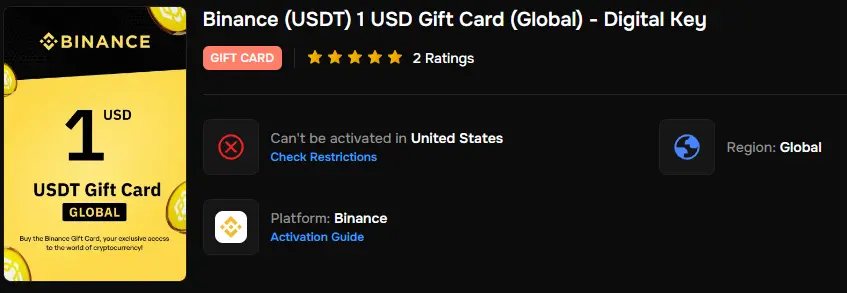
We accept USDT, USDC, and BTC Binance Gift Cards. Don't worry about regional activation restrictions—we can redeem them for you!
USDT Gift Card
Binance USDT (Tether) gift cards in any amount
USDC Gift Card
Binance USDC (USD Coin) gift cards in any amount
BTC Gift Card
Binance BTC (Bitcoin) gift cards in any amount
Purchase Gift Card
Select a trusted marketplace to buy Binance Gift Cards:
Buy the gift card using your preferred payment method:
Credit Card • PayPal • Debit Card • Other local payment methods
You can search for "Binance Gift Card" on Google to find additional marketplaces. Choose USDT, USDC, or BTC gift cards.
Open Discord Ticket
Join our Discord server and create a support ticket:
Step 1: Join Discord Server
Step 2: Navigate to the support channels
Step 3: Open a new ticket for "Gift Card Payment"
Send Gift Card Code
In your Discord ticket, send the gift card code with the following information:
Required Information:
- Gift card redemption code
- Gift card value (amount in USDT/USDC/BTC)
- Product you want to purchase
- License duration
Our team will redeem the gift card and activate your license within a few hours.
Regional Activation
If the gift card shows "Can't be activated in your region" (like United States restrictions), don't worry—we can still redeem it for you. Just send the code via Discord ticket!
Cashapp (Bitcoin)
Bitcoin Only
Cashapp payments are processed via Bitcoin only. You'll need to send Bitcoin directly from your Cashapp wallet.
If you're using Cashapp, you can purchase directly with Bitcoin:
Step 1: Learn how to send and receive Bitcoin on Cashapp
Step 2: Select cryptocurrency payment method in our store
Step 3: Send Bitcoin to the provided address
Binance Pay
Transfer funds directly using the Binance mobile app:
Binance Pay
Quick transfers within the Binance ecosystem
Terms & Refund Policy
Before making a purchase, please review our policies: